
Update, October 17: CAPS 0.1.48 makes Shadow a lot smarter. Ask about your ETA and whether you’ll make it on time, what the load pays, whether you’ll make it on this tank, your fuel economy, DEF, warning lights and gauges, the next town on your route and much more; damage reports now come in plain words. Say “Hey Shadow” and he greets you by the time of day, ask how his day is going or for a joke, and he now calls in about 3 miles from the drop to get you ready to back in and hand over the paperwork. Marker North can now give Shadow new lines, holiday greetings and announcements, and update the tablet’s checklists and hours-of-service limits, without a CAPS update. Also fixed: quitting ATS no longer leaves a crash report from the telemetry plug-in, thanks to a detailed report from a driver in our community. Close ATS before updating; no map rebuild is needed.
Update, October 16: CAPS 0.1.47 brings Shadow, your dispatcher. Set a push-to-talk key or controller button in Navigator Options → Voice, hold it and ask about your load, miles, fuel, hours or next turn; Shadow answers out loud in the voice you pick (Joe, Kristin or Bryce), on your PC, phone or iPad. He calls in when a new load rolls out, when you’re close, when fuel runs low and at the end of your shift, and Ivy takes the night desk. Also new: a tablet over your cab with Navigator, Dispatch, Load, Checklist, HOS, Logbook, Gauges, Truck and Media tabs that you can tilt to fit your dash (ATS needs to run borderless or windowed), the same tabs in Navigator on phones and iPads, multi-stop trips, a pre-trip checklist you sign with Certify, roadside inspections with two new achievements, a HUD strip, Classic and Modern gauges, CB chatter, Convoy Pulse on the map and Logbook running totals. Map builds no longer get blocked by Smart App Control or stopped by protected paid mods. Spoken turn directions now start off; turn them on with the Voice button on the map. Navigator rebuilds your map once after this update; keep driving while it builds. New to Marker North? Take the Tour or read the Driver’s Manual.
Update, October 11: CAPS 0.1.46 keeps your mods on the map. When a few road connections in your mods don’t line up with the rest of your map, Navigator now takes out just those connections, routes around them and keeps every mod; before, one bad junction could throw away the whole map build and leave you on the official map. Navigator tells you how many connections it skipped. If your last map build didn’t finish, or left a mod out because of this, Navigator builds your map again once by itself after the update. Also new: ready-made maps. When Marker North has a finished map for exactly your ATS version, DLC and map mods, Navigator downloads it in minutes instead of building it; mods that don’t change the map, like trucks and sounds, don’t affect the match. Every part is checked before it is used, and if anything doesn’t match, Navigator builds your map as before.
Update, October 10: CAPS 0.1.45 shows your map right away. The first time you open Navigator, it opens on a map with roads and your truck, and you can start driving while your own map builds in the background; before, you could be looking at a dark screen with only your truck. On a PC with no map yet, Navigator first builds the official ATS map from your own game files and the DLC you own, switches to it, and then adds your mods exactly as before. The built-in map is updated to the current ATS map with every SCS state, so roads and directions work everywhere from the first second, South Dakota included. When a new map is ready, Navigator waits until you are past your next turn, switches, and tells you “Your mod map is ready. Route updated.”; your route is worked out again on the new map. Also new: a Game clock widget with the in-game day and time (Options → Widgets), and a link to our Discord at the end of CAPS Setup. No map rebuild is needed for this update.
Update, October 9 (evening): CAPS 0.1.44 makes map builds skip a bad mod and keep going. Before it builds, Navigator now reads each of your map mods on its own; a mod with a damaged file is named and left out, and your map builds with the rest (mods that read fine are remembered, so this only takes time the first time). When a build stops without saying which mod caused it, Navigator finds every mod involved, even two or three, and keeps all the mods that work; before, two problem mods could leave you with the plain ATS map. One road, junction or ferry that Navigator can’t use is left off the map instead of stopping the whole build. If a mod is still listed in your ATS profile but its file is gone (for example after you downloaded a newer version), Navigator leaves that one out, the same way ATS runs without it. Builds started before your truck was on the road no longer stop with “ATS changed” and start over again and again, and when Navigator can’t prepare the map for your mods, the notice on your screen says why and what to do. If a mod keeps stopping map builds, we can now leave it out for you from our side without waiting for a new CAPS version. No map rebuild is needed; if your last map left out all of your map mods, Navigator rebuilds it once by itself.
Update, October 9 (later): CAPS 0.1.43 gets three of the most popular map mods building together: Reforma, ProMods Canada and ATS Expansion. With some mod lists, Reforma has a ferry to a port that isn’t on your map (La Paz); that one crossing is now left out instead of stopping the whole map build, and every other road and ferry stays. ATS Expansion v23 is read correctly again, and a mod that changes a few road connections is no longer left out over one dead-end road. When a map build can’t start, for example because ATS hasn’t finished loading your profile, Navigator now tells us why so we can help faster. Navigator rebuilds your map once by itself after this update; keep driving on your current map while it builds. Tip: load your profile in ATS and start driving before you open Navigator, so it sees your mods.
Update, October 9: CAPS 0.1.42 brings Euro Truck Simulator 2 to Marker North. CAPS now tracks your ETS2 deliveries just like ATS: Setup finds ETS2 and installs the telemetry plug-in there too, and updating CAPS adds it automatically if ETS2 is on your PC. On the website, a new ATS | ETS2 switch at the top of every page picks which game you are looking at. Your dashboard, trips, statistics, achievements, rankings, community statistics, driver profiles and VTC pages show one game at a time, and the two are never combined, so ATS drivers and ETS2 drivers each get their own leaderboards. ETS2 earnings show in euros. Navigator’s map is still ATS only for now; while you drive ETS2 it tells you ETS2 is coming soon, and CAPS keeps tracking your trip. Also new: when a map build stops, Navigator explains what happened in plain words and what helps (and a certain black cat may make an appearance), and city names on the map are another 10% larger. No map rebuild is needed for this update.
Update, October 8: CAPS 0.1.41 fixes map builds that finished but were thrown away at the very last step, which happened when a mod with a very large file was left out. Big truck and trailer mods are now recognised as not changing the roads, and fewer map mods are left out, for example Jazzycat’s overweight trailers pack and the Western and Eastern Canada Expansion, which were left out over a few empty map sections from older editor versions. City names on the map are 10% larger. Navigator rebuilds your map once by itself after this update; keep driving on your current map while it builds.
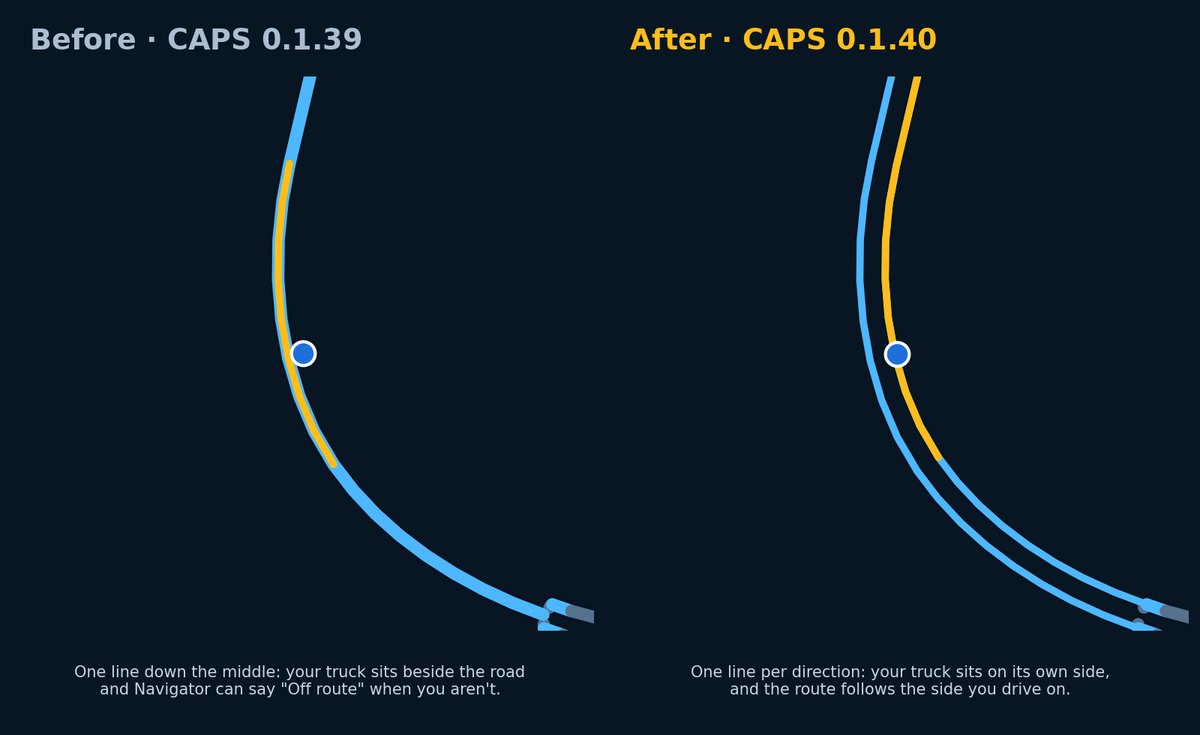
Update, October 3 (later): CAPS 0.1.40 fixes the truck sitting beside the road on divided highways. Highways with a median used to be drawn as one line down the middle, so on a road with two or more lanes each way your truck looked like it was next to the road, and Navigator could say “Off route” when you were right where you should be. Now each direction gets its own line: your truck sits on its own side, and the gold route follows the side you drive on. Navigator rebuilds your map once by itself to add this; keep driving on your current map while it builds.
Update, October 3: CAPS 0.1.39 brings the new Drive view: a tilted map that turns with your truck, a gold route, a turn card that grows when a turn is close (with lane arrows and the turn after it), and the speed limit from the game. Tap the view button to switch between Drive, Overview and Data. Choose Fastest, Balanced or Shortest routes from the route button (Automatic picks Balanced for trucks), and turn on Prefer interstates in Options. Map builds now tell you exactly which mods made it onto your map, and going back to a mod list you built before is instant. On maps built from this version on, deliveries aim for the drop-off area in the yard.
Update, October 2 (later): CAPS 0.1.38 fixes map builds that stopped with “The official ATS map could not be read even without mods” on some PCs with many DLCs. The map builder now uses more memory when your PC has it. If your map build failed, update CAPS and Navigator builds again. Close ATS before updating.
Update, October 2: CAPS 0.1.37 is digitally signed, so Windows shows a verified publisher and PCs with Smart App Control turned on no longer block the installer. Navigator now routes jobs to the pickup first and then the delivery, starts routes on the correct side of divided highways, and tells you when you have arrived at a place you found. Map builds are steadier, and we can now send a message straight to your Navigator, for example to follow up on a map build report. Close ATS before updating so the telemetry plug-in can update too.
Update, September 29: CAPS 0.1.36 adds ATS Road Trip support. Navigator now routes car jobs from Quick Jobs and the Dispatch Market, and CAPS logs them as trips. If a drop-off isn't on the map yet, Navigator routes you to the destination city. Close ATS before updating so the telemetry plug-in can update too.
Update, September 29: CAPS 0.1.35 makes map builds much more forgiving. If one of your map mods doesn't line up with your ATS version, Navigator now leaves out just that mod, tells you which one and why, and keeps all your other map mods. Before, one outdated mod could cost you every map mod. It also fixes a build that stopped on some PCs, and if a build ever fails, the details reach us automatically so we can fix it without asking you for files. If you lost map mods before, Navigator rebuilds your map once to bring them back.
Update, September 27: CAPS 0.1.34 makes rerouting smooth. Before, Navigator could freeze for a second or two on every screen when you missed a turn, while it worked out the new route. Now the map keeps moving and the new route appears when it is ready. CAPS updates itself: right-click the Marker North icon and choose Check for updates.
Update, September 27: CAPS 0.1.33 fixes Navigator reloading every 30 to 60 seconds on Android tablets with a built map. If your tablet kept jumping back to the "Checking your Marker North account" screen, install CAPS 0.1.33 from the Downloads page. Thanks to the drivers who reported it.
After 0.1.31, the most common report we heard was "my map finished, but it still looks the same." The map was ready, but Navigator only used it after a restart, and that step was easy to miss. CAPS 0.1.32 removes the restart completely.
It is also much faster. On our test PC with 28 mods and ATS running, a full map build went from 26½ minutes to under 11.
One Build, Then You Are Set
The map build is not something you wait for every time you play. It happens once, the first time Navigator sees your mod list. After that, Navigator opens your saved map right away, every time, as long as your mod list stays the same.
A new build only starts when you change your active mods (for example, you add a new map mod or a mod maker releases an update), and Navigator now handles that for you in the background. Switch back to a mod list you used recently, and your map is there instantly.
We know ten minutes is not instant. But it is ten minutes once, on your PC, instead of waiting days or weeks for someone else to update a map for you.
What Changed
- No More Restarts: When your map finishes building, Navigator switches to it by itself, on your PC and on your phone or tablet, and tells you when it is using the new map.
- Mod Changes Handled for You: Change your ATS mods while Navigator is open, or start Navigator before ATS, and it builds the map for your current mods in the background and switches when it is ready. Going back to a mod list you used recently is instant.
- Faster Builds: Windows no longer slows the map build down while ATS is in front, and the official ATS part of the map is saved after your first build and reused after that. On our test PC with 28 mods and ATS running, a build went from 26½ minutes to under 11.
- Big Map Mods: Large map mods such as Coast to Coast no longer fail the build over a single dead-end road that the mod itself removed.
- Disk Space: Each built map takes about 3 to 4 GB, and older versions kept every one. Navigator now keeps the map you are using plus your two most recent, and removes leftovers from unfinished builds. If your drive is too full to build, it tells you in plain words instead of failing with an error.
- Older Tablets: See below. Many of you use older tablets, and this one matters.
- More Widgets While It Builds: Estimated range, game time left, cargo weight, and truck and cargo can be shown while your map builds. Lane guidance settings moved to the Widgets tab.
- Easier Sign-Up: New drivers can create their Marker North account right from CAPS Setup.
- Faster Help: CAPS can send a small build report when a map build finishes, so we can spot problems without waiting for you to send diagnostics. It never includes your activation token or tablet pairing code, and you can turn it off in Navigator Options.
Older Tablets Welcome
A lot of you run Navigator on an older tablet, and that is exactly what it should be good for. Some older tablets were showing a white or flickering map while the buttons and truck arrow stayed on screen. The cause was the tablet running out of graphics memory, which makes the map's drawing surface disappear.
- The map fixes itself: if the tablet drops the map, Navigator shows "Map restarting" and brings it back by itself, instead of staying white.
- Lighter on older hardware: tablets draw the map at a sensible sharpness instead of the maximum, and a tablet that lost its map recently automatically uses the lighter mode for a while.
- You choose: in Navigator Options → Maps → Map detail, pick Automatic (recommended), Lite for older tablets, or Full sharpness.
If your tablet still has trouble, tap Report navigation issue in Navigator Options. The report now includes the tablet's graphics chip, which helps us tune this further.
Built on What You Ask For
CAPS stands for Connected Autonomous Platform System, and that is exactly what we are building: one connected system that keeps getting better and does as much as it can for you by itself, so you can just drive. Finding your map, building it, switching to it, cleaning up after itself: all of that should happen without you thinking about it.
Marker North is built around what drivers want to see, not what I want. Nearly every change in this release started as a report or a request from one of you, so keep them coming in our Discord.
Questions We Get Asked
We want you to know what is happening behind the scenes, so here are straight answers to the questions drivers ask us most.
Why does Navigator build the map on my own PC?
Because your game is unique. Every driver has a different set of map mods, in a different load order, at different versions. Navigator reads the same game and mod files ATS loads on your PC and builds a map that matches exactly what you drive on.
The biggest reason is this: when a mod maker updates their map, you do not have to wait for us. There is no Marker North version of each mod that we have to update first. Update the mod, and Navigator builds the new version on your PC. New mods work the same way.
Why are there so many CAPS updates?
Marker North is in Pre-Alpha, and we would rather fix things quickly than make you wait. Behind the scenes we are:
- making the map build faster, especially the first one,
- fixing bugs you report, often within a day,
- making sure more mods and mod combinations build correctly,
- and preparing the groundwork for features that are still to come.
Each update is tested on our own PCs with real mod lists before it goes out. As Marker North matures, updates will come less often.
What is the benefit of doing it this way?
- Your map, not a generic one: roads, cities and companies from your map mods show up, and routes follow the roads you actually have.
- No waiting on us: mod updates and new mods work as soon as you install them.
- Everything stays on your PC: your game and mod files are only read, never changed or uploaded.
- It gets faster over time: the first build does the most work; later builds reuse what they can, and switching back to a recent mod list is instant.
How long does a map build take, and do I have to do it every time?
No, it is a one-time step. The first build usually takes about 10 to 30 minutes, and can take up to an hour on slower PCs or with many map mods. After that, Navigator opens your saved map right away every time, as long as your mod list stays the same.
A new build only happens when you change your active mods, and it runs in the background while you drive. Switching back to a mod list you used recently is instant, because Navigator keeps your recent maps.
Can I drive while my map builds?
Yes. Navigator shows the built-in ATS map and routes on the roads around your truck while it works. Roads that only exist in your mods may be missing until the build finishes, and then Navigator switches over by itself.
What if my map build fails?
Your game is not affected, and Navigator keeps working on the map you already have, or on the built-in ATS map. Navigator tells you what happened in plain words when it can (for example, when your drive is too full).
If a build keeps failing, right-click the CAPS tray icon and choose Send Navigator diagnostics, or tell us in our Discord. With build reports turned on, we often see the problem before you even tell us.
How much disk space does Navigator need?
Each built map takes about 3 to 4 GB, and Navigator keeps up to three. A build needs about 8 GB of free space while it works; the finished map uses less than that.
Does Navigator change my game or my mods?
No. Navigator only reads your ATS game and mod files to build the map. It never changes, moves or uploads them, and the map it builds stays on your PC.
Still Pre-Alpha
We test every release on our own PCs with different mod lists, but we cannot test every ATS mod. If something looks wrong, right-click the CAPS tray icon and choose Send Navigator diagnostics. The report does not include your CAPS activation token or tablet pairing code.
You can read the full version history in the Pre-Alpha release notes.
Thank you for driving with us while we build this.
Sincerely,
Drew