Back to the current release notes
Marker North CAPS

Pre-Alpha Release Notes

Every CAPS release from Marker North’s Pre-Alpha, 0.1.0 to 0.1.48, kept as it was. Marker North is now in Alpha: see the current release notes.

Last Pre-Alpha release

CAPS + Navigator 0.1.48 Pre-Alpha

Shadow gets smarter: he understands far more of what drivers ask, from your ETA to your gauges, calls in 3 miles before the drop, and can learn new lines from Marker North without a CAPS update. Plus a clean exit from ATS.

Pre-Alpha

Shadow gets smarter

Ask about your ETA and whether you’ll make it on time, what the load pays, if you’ll make it on this tank, your fuel economy, DEF, warning lights and gauges, the next town on your route, and plenty more. Damage reports now come in plain words.

Talk to him like a person

Say “Hey Shadow” and he greets you by the time of day. Ask how his day is going, ask for a joke or a tip, say good night. “10-4” only takes a route he just offered.

The 3-mile call

About 3 miles from the drop, Shadow calls in: be ready to back it in, drop the load and hand over the paperwork.

New lines without updates

Shadow can now learn new answers, call-in lines, city facts, holiday greetings and announcements straight from Marker North, no CAPS update needed. Checklist items and hours-of-service limits can be updated the same way.

Clean exit from ATS

Quitting ATS no longer leaves a crash report behind from the telemetry plug-in. Thanks to a detailed report from a driver in our community.
Read the CAPS installation guide
Change history

Changelog

0.1.48 Pre-Alpha

Shadow gets smarter

October 17, 2026

  • Shadow understands many more questions: your ETA and whether you’ll make it on time, what the load pays, whether you’ll make it on this tank, fuel economy, DEF, warning lights, oil pressure, engine temperature, air pressure, battery and RPM, the engine brake and retarder, the next town on your route, the time at home, and what engine you have.
  • Damage reports in plain words: engine, cab, trailer and cargo, plus anything else that’s really hurting, and whether it’s time for a shop.
  • Small talk: ask how his day is going, ask for a joke or a driving tip, say good night. “Hey Shadow” on its own gets a greeting by the time of day.
  • Shadow now calls in about 3 miles from the delivery: be ready to back it in, drop the load and hand over the paperwork. The roll-out briefing ends with a few different sign-offs.
  • “10-4”, “copy that” and “OK” only take a route Shadow just offered; otherwise he says “Copy that.”
  • Fixed: “Is the engine brake on?” answered about the parking brake, and “how many miles per gallon?” gave the distance to the delivery.
  • Marker North can now give Shadow new answers, call-in lines, city facts, holiday greetings and spoken announcements, and update the tablet’s checklists and hours-of-service limits, without a CAPS update.
  • Fixed: quitting ATS left a crash report from the telemetry plug-in on every exit. Thanks to a detailed report from a driver in our community.
  • Close ATS before updating so the telemetry plug-in can be replaced. No map rebuild is needed for this update.
0.1.47 Pre-Alpha

Meet Shadow, your dispatcher

October 16, 2026

  • Shadow, your dispatcher: set a push-to-talk key or controller button in Navigator Options → Voice, hold it and ask about your load, miles, fuel, hours, next turn and more. Shadow answers out loud in Joe’s, Kristin’s or Bryce’s voice, on your PC, phone or iPad. Repeat plays the last answer again.
  • Shadow calls in by himself when a new load rolls out, when you’re about 5 miles out, when fuel gets low and at the end of your shift. Turn call-ins off in Options → Voice. Ivy takes the night desk from 8 PM to 6 AM game time.
  • Pop-out tablet over your cab: Navigator, Dispatch, Load, Checklist, HOS, Logbook, Gauges, Truck and Media tabs, tilt to fit your dash, a down arrow to hide the tab bar. It opens once after you install, with a short welcome. ATS needs to run borderless or windowed.
  • The same tabs in Navigator on phones and iPads. Type or say a question for Shadow there. No new app needed.
  • Multi-stop trips: add places as stops, and Navigator routes through them in order.
  • Pre-trip checklist with a Certify button that signs it for you. Roadside inspections at weigh stations, with two new achievements: Roadside Ready and Spotless Record.
  • HUD strip with speed, limit, gear and next turn; gauges in Classic or Modern with a night look; CB chatter on channel 19; Convoy Pulse on the map; Logbook running totals.
  • Map builds: PCs with Smart App Control on no longer block map builds. Protected paid mods (for example some trailer packs) are left alone instead of stopping the build; they have no roads. A build step is only stopped when it makes no progress for 30 minutes.
  • Spoken turn directions are now off until you turn them on with the Voice button on the map; Navigator remembers your choice.
  • Navigator rebuilds your map once after this update (ATS 1.61.3.18 changed the official game files, and maps that left mods out get a fresh try). Keep driving on your current map while it builds.
0.1.46 Pre-Alpha

Your mods stay on the map

October 11, 2026

  • When a few road connections in your mods don’t line up with the rest of your map, Navigator now takes out just those connections and keeps your whole map with every mod. Routes go around those spots, the way the game does at a dead end. Before, the whole map build could be thrown away and you were left on the official map.
  • Navigator tells you when it skipped connections, for example “A few road links in your mods didn’t line up, so Navigator routes around them (12 links). The roads are still on the map.”
  • If your last map build didn’t finish, or left a mod out because of this, Navigator builds your map again once by itself after the update. Keep driving on your current map while it builds.
  • Ready-made maps: when Marker North has a finished map for exactly your ATS version, DLC and map mods, Navigator downloads it in minutes instead of building it. Mods that don’t change the map, like trucks and sounds, don’t affect the match. Every part of the download is checked before use; if anything doesn’t match, Navigator builds your map as before.
0.1.45 Pre-Alpha

Your map shows up right away

October 10, 2026

  • The first time you open Navigator, it opens on a map with roads and your truck right away, and you can drive while your own map builds. Before, Navigator could show a dark screen with only your truck for a long time while it built.
  • On a PC with no map yet, Navigator first builds the official ATS map from your own game files and the DLC you own, switches to it, and then adds your mods the same way as before.
  • The built-in map is updated to the current ATS map with every SCS state, South Dakota included, so roads and directions work everywhere from the first second while your own map builds.
  • When a new map is ready, Navigator waits until you are past your next turn before it switches, then says “Your mod map is ready. Route updated.” (spoken too if you use spoken turns). Your route is worked out again on the new map, so new roads from your mods are used.
  • New Game clock widget: the in-game day and time, for example Tue 2:35 PM. Turn it on in Options → Widgets.
  • The last page of CAPS Setup links to the Marker North Discord, after an install and after an update.
  • No map rebuild is needed for this update.
0.1.44 Pre-Alpha

Map builds skip a bad mod and keep going

October 9, 2026

  • Before building, Navigator reads each of your map mods on its own. A mod with a damaged file is named and left out, and your map builds with the rest. Mods that read fine are remembered, so this only takes time the first time.
  • When a build stops without saying which mod caused it, Navigator now finds every mod involved, even two or three, and keeps all the mods that work. Before, two problem mods could leave you with the plain ATS map.
  • One road, junction or ferry a mod made in a way Navigator can’t use is left off the map instead of stopping the whole build.
  • A mod that’s still listed in your ATS profile but whose file is gone (for example after updating it) is left out, and your map builds with the rest. ATS runs without it too.
  • Map builds started before your truck was on the road no longer stop with “ATS changed” and start over again and again.
  • When Navigator can’t prepare the map for your mods, the notice now says why and what to do, instead of only “restart Navigator”.
  • If a mod keeps stopping map builds, Marker North support can now leave it out for you from our side, without waiting for a new CAPS version. Navigator tells you which mod and why.
  • No map rebuild is needed for this update. If your last map left out all of your map mods, Navigator rebuilds it once by itself.
0.1.43 Pre-Alpha

Reforma, ProMods Canada and ATS Expansion build

October 9, 2026

  • A ferry crossing to a port that isn’t on your map (for example Reforma’s La Paz with some mod lists) is left out instead of stopping the whole map build. Every other road and ferry stays on your map.
  • ATS Expansion v23 is read correctly again and is no longer left out.
  • A mod that changes a few road connections no longer gets left out over one dead-end road.
  • When a map build can’t start (for example ATS hasn’t finished loading your profile), Navigator now tells us why, so we can help faster.
  • Navigator rebuilds your map once by itself after this update. Keep driving on your current map while it builds.
0.1.42 Pre-Alpha

ETS2 trip tracking and friendlier map messages

October 9, 2026

  • CAPS now tracks Euro Truck Simulator 2 trips. Setup finds ETS2 and installs the telemetry plug-in there too; updating CAPS adds it automatically if ETS2 is on your PC.
  • New ATS | ETS2 switch at the top of the website. Your dashboard, trips, statistics, achievements, rankings, community statistics, driver profiles and VTC pages show the game you pick. The two games are never combined. ETS2 earnings show in euros.
  • Navigator’s map is still ATS only. While you drive ETS2, Navigator says ETS2 is coming soon, and CAPS keeps tracking your trip.
  • When a map build stops, Navigator now explains what happened in plain words and what helps, for example a game file that needs a quick repair in Steam. You keep driving on your current map.
  • City names on the Navigator map are another 10% larger.
  • No map rebuild is needed for this update.
0.1.41 Pre-Alpha

Map build fixes and bigger city names

October 8, 2026

  • Fixes map builds that finished but were thrown away at the very last step (“Your map couldn’t be updated this time”) when a mod was left out for having a file too large to read.
  • Truck and trailer mods with very large files (for example some paid truck mods) no longer get left out. Navigator sees they don’t change the roads and lists them as not needed for the map.
  • More map mods make it onto your map: mods with files that carry no checksum, mods that write a number like “205.” (for example Jazzycat’s overweight trailers pack), and map mods with a few empty map sections saved by older editor versions (for example the Western and Eastern Canada Expansion).
  • City names on the Navigator map are 10% larger.
  • Navigator rebuilds your map once by itself after this update. Keep driving on your current map while it builds.
0.1.40 Pre-Alpha

Divided roads: one line per direction

October 3, 2026

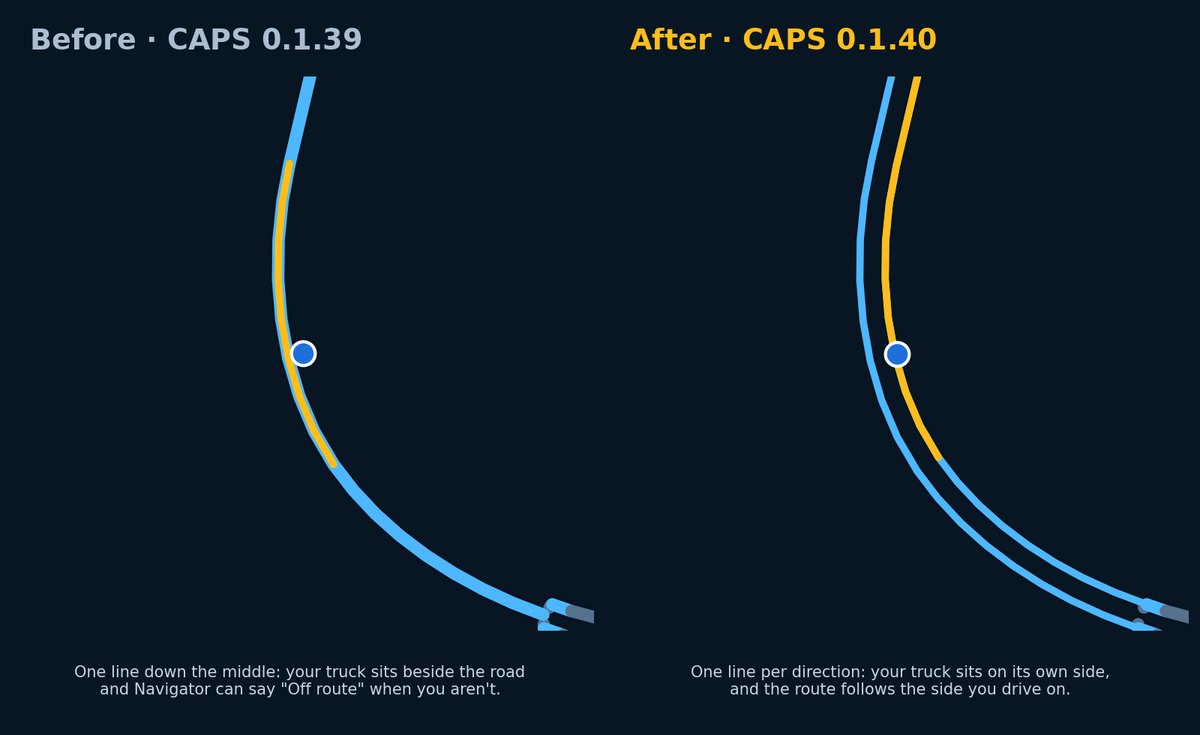
The same divided highway before and after CAPS 0.1.40: before, one line down the middle with the truck beside it; after, one line per direction with the truck and the gold route on its own side.
  • Highways with a median (two or more lanes each way) are drawn as one line per direction instead of one line down the middle. Your truck now sits on its own side of the road instead of beside it.
  • The gold route follows the side of the road you drive on.
  • No more false “Off route” on wide divided roads. Navigator still notices when you really leave the route or drive on the wrong side.
  • Your truck arrow stays on the route line while you drive.
  • Navigator rebuilds your map once by itself to add divided roads. This takes about as long as a normal map build; keep driving on your current map meanwhile.
  • The map of the whole route (Overview) stays as clean as before.
  • VTC pages: signed-in drivers now see that they are signed in, and Login brings you back to the VTC you were applying to.
0.1.39 Pre-Alpha

Drive view, route types and clearer map builds

October 3, 2026

  • New Drive view: a tilted map that turns with your truck and shows the route in gold. A turn card grows when a turn is less than a mile away (distance, road, lane arrows and the turn after it) and shrinks to a small pill on long stretches.
  • Speed-limit sign from the game: it grows for a few seconds when the limit changes and again when you are well over, and your speed turns gold when you are over the limit.
  • Job strip (where you picked up, where you deliver, cargo, miles left) and one instrument strip (speed, gear, fuel, range, arrival and game time left).
  • View button: Drive, Overview (the whole route) or Data (your widgets where you placed them). In Drive, widgets sit in a side rail you can tuck away; on phones they are in a sheet you swipe up. “Add a widget” lets you pick and order them.
  • Route types: Fastest, Balanced (fewer turns and minor roads) or Shortest, from the new route button. Automatic uses Balanced for trucks and Fastest for Road Trip cars; your own choice always wins.
  • Prefer interstates (Options → Maps). Works with maps built from this version on; Navigator does not rebuild your map just for this.
  • Deliveries aim for the drop-off area in the company yard, and pickups for the trailer area, on maps built from this version on.
  • Map results in plain words: “Your map is ready”, “Your map is ready: 9 of 10 map mods included” (with which mod was left out and why), or “Your map couldn’t be updated this time” (you keep driving on your previous map and Navigator tries again by itself).
  • Options → About → Map mod detection lists every active mod with what your map did with it: on your map, left out (and why), not needed for the map, couldn’t check (locked), or waiting for the next build.
  • Switching back to a mod list you built before is instant, and Navigator says so. With 100 GB or more free on the map drive, it keeps up to 8 saved maps (otherwise 3, as before).
  • Map builds set aside a mod with broken company files in seconds instead of after a full attempt, and locked mods are checked up front without warnings. Locked mods are usually graphics, weather or sound mods and don’t change the roads on your map.
  • Fixes Navigator moving in jumps on jobs to some cities (for example East St. Louis), where the route was worked out again and again.
0.1.38 Pre-Alpha

Map builds on PCs with many DLCs

October 2, 2026

  • Fixes map builds that stopped with “The official ATS map could not be read even without mods” on some PCs with many DLCs. The map builder ran out of memory reading the official ATS 1.61 map for the first time.
  • The map builder now uses up to a quarter of your PC’s memory (between 1.5 GB and 8 GB) instead of a fixed 1.5 GB. PCs with little memory build exactly as before.
  • No map rebuild needed: maps that already built keep working. If your last build failed, Navigator builds again after the update.
0.1.37 Pre-Alpha

Signed, smarter routing and steadier builds

October 2, 2026

  • CAPS, Navigator, the installer and the ATS telemetry plug-in are now digitally signed. Windows shows a verified publisher, and PCs with Smart App Control turned on no longer block the installer.
  • Job routing: when you take a job, Navigator routes you to the pickup first and then to the delivery.
  • Fixes routes that started on the wrong side of a divided highway. The route now starts in the direction your truck is facing.
  • Road Trip car jobs route closer to the actual drop-off: Navigator uses the game’s own GPS target when it is available.
  • If a job’s city isn’t on your Navigator map (usually because a map mod was left out of your build), Navigator says which city and why. Follow the in-game GPS, or save the game and Navigator routes to the game’s GPS target.
  • Places you pick with Find (for example truck parking) now show “Arrived” when you get there, and clear by themselves when you drive away.
  • Fuel stop search picks stations that suit what you’re driving, car or truck.
  • Your previous map stays on screen while a new one builds, and notices you dismiss stay dismissed.
  • Messages from Marker North: we can now send a message straight to your Navigator, for example to follow up on a map build report. Tap “Got it” to let us know you saw it.
  • New About section in Navigator (Options → About) and in CAPS, with your versions, links and third-party notices.
  • Map builds: a build step that crashes is tried once more instead of being blamed on a mod; if your mod files change during a build (for example a Steam Workshop update), the build restarts by itself when things are quiet; problem mods are named more clearly; and mods without map content are skipped.
  • Build reports now include non-personal PC details (such as graphics, Windows version and drive type) and a likely cause, so we can fix problems faster. Never names, addresses, serial numbers or email addresses. See section 6 of the Privacy Policy.
  • Delivered and cancelled jobs are recorded more reliably: one delivery is logged once, and restarting CAPS no longer risks a false delivery.
  • Close ATS before updating CAPS so the signed telemetry plug-in can be updated too.
0.1.36 Pre-Alpha

Road Trip car jobs

September 29, 2026

  • Navigator now routes ATS Road Trip car jobs (Quick Jobs and the Dispatch Market). Before, a car job showed no route and no cargo.
  • CAPS reads the new car job details from the game: pickup and drop-off city and company, cargo, delivery time and pay. Car jobs are logged as trips, like truck jobs.
  • If a drop-off is not a company on the map yet (for example some car dealers, marinas and gas stations), Navigator routes you to the destination city and says so, instead of showing no route.
  • Updated ATS telemetry plug-in (Marker North build of the RenCloud plug-in, SCS SDK 1.15). Close ATS before updating CAPS so the plug-in can be updated.
0.1.35 Pre-Alpha

Map builds that keep your mods

September 29, 2026

  • If a map mod doesn't line up with your ATS version (for example a mod made for 1.60), Navigator now leaves out only that mod and keeps the rest. Before, one outdated mod could make Navigator drop every map mod.
  • Navigator tells you which map mods were left out and why, right on the map screen.
  • Maps that lost mods because of the old behavior are rebuilt once, automatically, to bring your mods back.
  • Fixes map builds that stopped partway on some PCs when a mod replaced a company depot the builder couldn't read. The builder now uses the game's own version of that depot.
  • If a map build fails, the full details are sent in the build report (with your Windows user name removed), so we can fix it without asking you for log files. The build's logs are kept until the report is sent.
  • Fines and tolls are no longer lost when they happen while CAPS is sending an update.
  • Clean trips now count only damage done during that trip, not wear your truck already had. This makes Smooth Operator, Clean Five and Clean Streak fair.
0.1.34 Pre-Alpha

Smoother rerouting

September 27, 2026

  • Fixes Navigator freezing for a second or two when you leave the route. The new route is now calculated in the background: the truck, map and widgets keep moving, guidance shows "Off route; recalculating", and the new route appears when it is ready. This affected every screen: PC browser, iPhone, iPad and Android.
  • Fewer small pauses while driving on a built map: Navigator now loads map detail a little ahead of the truck instead of at the edge of the screen.
  • Fixes the route overview on iPhone and iPad for very long routes.
0.1.33 Pre-Alpha

Android tablet fix

September 27, 2026

  • Fixes Navigator reloading every 30 to 60 seconds on Android tablets with a built map. The map redrew its detailed roads every time the camera followed the truck, which ran older tablets out of memory; it now redraws only when the truck reaches a new part of the map.
0.1.32 Pre-Alpha

No more restarts, faster map builds

September 27, 2026

  • Switches Navigator to a newly built map by itself, without a restart, on the PC and on paired phones and tablets.
  • Builds the map for new mods in the background when ATS mods change while Navigator is open, or when ATS starts after Navigator; switching back to a recent mod list is instant.
  • Keeps Windows from slowing the map build while ATS is running, and saves the official ATS map check for reuse (28 mods with ATS running: 26.6 to 10.8 minutes).
  • Builds large map mods such as Coast to Coast that remove a few official road connections.
  • Keeps the map in use plus the two most recent, removes leftover build folders, and needs 8 GB free before a build, with a plain message when space runs out.
  • Recovers the map automatically on tablets that run low on graphics memory, with a new Map detail setting (Automatic, Lite, Full).
  • Adds Estimated range, Game time left, Cargo weight and Truck and cargo widgets to the map building screen; Lane guidance moved to the Widgets tab.
  • Lets new drivers create a Marker North account from CAPS Setup.
  • Sends a small build report after map builds (can be turned off in Navigator Options) so support can see problems right away.
0.1.31 Pre-Alpha

Map builds that finish, with progress you can see

September 26, 2026

  • Shows map build progress on the preparation page and the full Navigator: step of seven, percent, and estimated time left.
  • Builds maps for Steam Workshop mods that share a file name, such as base.scs and universal.scs.
  • Skips locked or encrypted mods immediately instead of retrying the build.
  • Keeps preparing routes for new jobs and teleports during every step of a map build.
  • Finds delivery cities that exist only in map mods, such as Alaska, from the driver's own map files.
  • Keeps turn directions working on mod roads whose road pieces are listed at only one end.
  • Limits the final route check so a map build can no longer stall at 83 percent.
  • Updates the built-in official map and city list to ATS 1.61.2, including South Dakota.
  • Tells the driver when ATS mods change while Navigator is open.
  • Retries a map build that failed under an earlier CAPS version instead of waiting a day.
  • Includes every log of the latest map build, with the real error message, in Navigator diagnostics.
  • Opens the full Navigator right away when no mods are active; with mods, the preparation page routes mod roads until the map is ready.
  • Points the truck arrow in the direction of travel, follows road curves at turns, and stops recalculating while parked.
  • Setup finds ATS in Steam libraries on any drive and keeps the telemetry plug-in in place after an update.
0.1.28 Pre-Alpha

Active-profile import and support diagnostics

September 25, 2026

  • Reads all mounted files reported for each active ATS mod, including Workshop ZIP packages and archives nested in mounted directories.
  • Reports mounted loose map files that still need directory parsing instead of silently skipping them.
  • Adds Send Navigator diagnostics and Export Navigator diagnostics (.txt) to the CAPS tray menu.
  • Includes the detected ATS log path, active mod inputs, cache state, and latest map preparation result in support diagnostics.
  • Preserves existing CAPS settings and the nearby-first map preparation from 0.1.27.
0.1.27 Pre-Alpha

Usable nearby map while the rest builds

September 24, 2026

  • Starts mobile pairing and the normal Navigator interface independently of full profile compilation.
  • Parses truck-area sectors first and compiles a bounded local routing graph while the wider road and ferry graph builds in the background.
  • Prioritizes the active job corridor, replacing that target when the driver changes jobs or teleports.
  • Tracks archives per active ATS profile and reuses unchanged cached sector records when the game version and parser are compatible.
  • Reads locally installed ATS 1.61 South Dakota archives; no game or mod archives are distributed with CAPS.
  • Keeps map orientation, widgets, toolbar controls, and turn guidance available while background preparation continues.
  • Retries Windows local-preview file replacement after temporary access failures and preserves the previous preview if publication must wait.
  • Tested live routes with South Dakota and ProMods Canada 1.6.4 on iPhone and Android, including a job change to a distant city.
0.1.22 Pre-Alpha

Responsive fuel-stop routing and clear CAPS versions

September 21, 2026

  • Routes selected fuel stops through a nearby connected road instead of stalling on an isolated yard fragment.
  • Keeps the selected destination marker visible while Navigator calculates and displays the route.
  • Preserves the emergency fix that serializes Navigator startup from CAPS tray actions.
  • Labels Windows notifications as Marker North CAPS, displays version 0.1.22 in About, and removes the source revision suffix from setup version details.
  • Passed a local upgrade and live fuel-waypoint test with ATS 1.60 and the validated nine-mod profile. More American Cities remains outside that profile.
  • Multi-point trip support remains planned work and is not included in this release.
0.1.21 Pre-Alpha

Emergency Navigator startup coordination

September 20, 2026

  • Prevents simultaneous CAPS tray actions from starting competing Navigator routing sessions.
  • Retains the portable official-map and validated nine-mod profile support introduced with 0.1.20.
  • Preserves the connected account, startup preference, Navigator settings, and reviewed ATS telemetry plug-in during upgrade.
0.1.20 Pre-Alpha

Portable Navigator and local map profiles

September 20, 2026

  • Packages Navigator's routing runtime with CAPS so it no longer depends on the development folders on the driver's PC.
  • Prepares supported ATS map profiles locally from the driver's own installed game and mod files, with an official-map compatibility path and a separately validated nine-mod stack.
  • Keeps tablet pairing on port 47890 and preserves existing CAPS connection and pairing settings during the 0.1.19 upgrade.
  • Does not distribute third-party map archives or add More American Cities to the validated stack.
  • The separate iPhone and iPad Navigator 0.1.5 build 11 is available to existing TestFlight testers; it is not a public App Store release.
0.1.19 Pre-Alpha

Guided tablet access on trusted Public networks

September 12, 2026

  • Checks the Windows network profile when you choose Connect Android tablet or iPad. Private-network pairing continues without the extra permission prompt.
  • Offers optional administrator-approved access on a trusted Public network, limited to TCP port 47890, the selected adapter, current PC address, and local subnet.
  • Explains that this permission persists after CAPS closes or the PC restarts, and can apply on a future Public network with matching addresses.
  • Adds Disable Public-network tablet access to remove CAPS opt-in rules without changing Private-network access or turning off the firewall.
  • Keeps pairing and account access checks. Guest Wi-Fi isolation, managed policy, or other security software may still block a connection.
  • Includes the 0.1.18 Navigator improvements. No new Android app update is required for this network-access change; iOS remains in development.
0.1.18 Pre-Alpha

Navigator stability and tablet compatibility

September 12, 2026

  • Synchronizes truck-marker and following-camera movement to reduce visible stuttering.
  • Corrects the displayed truck heading for the map projection without changing routing telemetry.
  • Retains the Navigator session while waiting for fresh ATS telemetry.
  • Adds iPad test-app pairing instructions alongside Android pairing.
  • Displays installed and available CAPS versions and improves verified-update file handling.
  • Preserves pairing, private-network restrictions, and account access checks. No third-party map files are distributed.
  • The Android speech repair is a separate Navigator 0.1.7 app update; installing CAPS alone does not update the Android app.
0.1.16 Pre-Alpha

Verified in-app CAPS updates

September 2026

  • Lets drivers download a CAPS update directly from the tray menu after they choose to install it.
  • Checks the downloaded setup file against the release manifest SHA-256 before Windows is asked to run it.
  • Requests the Windows permission needed to safely close CAPS and Navigator during an update.
0.1.15 Pre-Alpha

Direct Navigator QR pairing

September 2026

  • Changes CAPS QR pairing to open Marker North Navigator directly instead of relying on a browser redirect.
  • Keeps the private PC address, port, and one-time pairing code together when a tablet scans the code.
0.1.14 Pre-Alpha

Android Navigator and Coast to Coast support

September 2026

  • Moves Marker North Navigator from port 8790 to dedicated port 47890.
  • Allows Marker North to run alongside other external applications that use their own local ports.
  • Updates Android tablet pairing, browser access, installer checks, and support guidance together.
  • Keeps tablet access limited to paired devices on the Windows Private local subnet.
  • Adds QR pairing and a full-screen Android tablet companion for Navigator.
  • Detects an active Coast to Coast map mod and loads its roads and cities without modifying the source mod.
  • Adds Android text-to-speech support for upcoming turn instructions.
  • Restores recorded route maps on Trip Details after a map-style regression left the route panel blank.
  • Changes the Live Map driver card from ATS game-time ETA to an estimated real-play-time ETA based on the ATS 1:20 scale and smoothed driving speed.
  • Adds a Downloads-page Google Play status area that will link to the store after approval.
0.1.13 Pre-Alpha

Paired Android tablet navigation

September 2026

  • Adds Connect Android tablet to the CAPS tray menu.
  • Protects Navigator with a persistent pairing code and private local-network session.
  • Corrects the Windows Firewall rule for the HTTP.sys-hosted Navigator service.
  • Continues installation safely when an interrupted older upgrade leaves behind a process whose executable is already gone.
  • Labels Navigator as Pre-Alpha instead of a local V1 proof.
  • Preserves existing CAPS accounts, settings, and the reviewed ATS telemetry plug-in during upgrade.
0.1.10 Pre-Alpha

Reliable CAPS and Navigator updates

September 2026

  • Closes running CAPS and Navigator processes before replacing installed files.
  • Recognizes and closes a stale Navigator process left behind by an earlier Windows Installer update.
  • Waits for local Navigator port 8790 to be available before installation continues.
  • Preserves the connected account, startup preference, Navigator settings, and reviewed ATS telemetry plug-in.
0.1.9 Pre-Alpha

Navigator polish and reliability

September 2026

  • Added Open Navigator to the CAPS tray menu, which starts the local Navigator automatically when selected.
  • Shows a clear local-port message if another application prevents Navigator from starting.
  • Stops spoken navigation from repeating the same instruction after routine route recalculations.
  • Reads ATS map-mod information safely while the game is actively writing its log.
0.1.8 Pre-Alpha

CAPS + Premium Navigator

September 2026

  • Added Marker North Navigator for Windows to the single CAPS installer.
  • Added ATS-directed routing, live truck tracking, destination and nearby-service search, clickable map destinations, route cancellation, and rerouting.
  • Added day, night, and high-contrast map themes, visibility controls, routing preferences, selectable truck markers, spoken directions, and navigation issue reports.
  • Added automatic full-screen locking when Navigator access is revoked or expires.
  • Stores generated routes and issue reports in the driver's local application-data folder so Navigator runs correctly from Program Files.
0.1.7 Pre-Alpha

Quiet CAPS startup

August 2026

  • CAPS is now a Windows notification-area application and no longer leaves a command window open.
  • Desktop and Start Menu shortcuts explicitly start CAPS in background mode.
  • Added “Copyright © 2026 Marker North. All rights reserved.” to the tray About window.
0.1.6 Pre-Alpha

Verified download and map wording

August 2026

  • Published a uniquely versioned CAPS setup file so the Downloads button cannot resolve to a cached older installer.
  • CAPS setup identifies itself as version 0.1.6 Pre-Alpha.
  • Live Map cards now show “No active delivery” when no job distance is available.
0.1.5 Pre-Alpha

Installer reliability corrections

August 2026

  • Restored CAPS desktop and Start Menu shortcuts.
  • Improved existing-installation detection and closes the previous CAPS client before Windows applies the update.
  • Added the visible setup version and removed the inactive browser sign-in option.
0.1.4 Pre-Alpha

CAPS update experience

August 2026

  • Existing installations now open directly into an update flow that preserves the Marker North connection, ATS plug-in, and startup preference.
  • CAPS checks the verified release manifest at startup and periodically afterward, with a short tray notification when a newer version is available.
  • The tray's Check for updates action now confirms whether an update is available before opening Downloads.
0.1.3 Pre-Alpha

Distance-to-delivery telemetry

August 2026

  • CAPS now sends the remaining navigation distance from ATS for active deliveries.
  • The Live Map can display that distance in miles beside ETA, while respecting each driver's cargo-sharing preference.
0.1.2 Pre-Alpha

Installer payload correction

August 2026

  • Corrected the self-contained setup payload so the reviewed RenCloud telemetry plug-in is available during installation.
  • Added final-EXE payload verification to the release build, preventing a setup file from being published when its required plug-in files cannot be extracted.
0.1.1 Pre-Alpha

Fresh telemetry and client maintenance

August 2026

  • CAPS now stops sending retained game coordinates when ATS is closed, so drivers clear from the Live Map after the normal short session timeout.
  • Added clearer installed-client maintenance for update, uninstall, and relaunch workflows.
  • Marker North account registration and CAPS setup now use a Marker North email address and password.
0.1.0 Pre-Alpha

Initial CAPS installer release

August 2026

  • Added the self-contained Windows CAPS installer.
  • Added Marker North Terms, Privacy Policy, and third-party notices to setup.
  • Added browser approval for accounts created with Google or Discord; their provider passwords are never entered into CAPS.
  • Added ATS folder selection, reviewed telemetry plug-in installation, Windows-start preference, and a Marker North system-tray icon.